

How Amity Executive Education runs every admission, from first form to final fee, in one platform
Amity Executive Education admits working professionals through applications, interviews, scholarships and instalment fees. Each step lived in a different tool. Filari mapped the six stages, then built one Laravel platform with no-code forms, stage rules, online payments and LeadSquared kept in sync.
Admissions ran across a web form, a CRM, payment links and spreadsheets. No one could see where an applicant stood.
One platform that takes each applicant through six stages, with a different form for every programme and LeadSquared kept in sync.
One record per applicant, 5 CRM events sent automatically, fees collected online at every stage.
Project snapshot
An admission management system for working-professional programmes
- Client
- Amity Executive Education
- Industry
- Education > Executive Education
- Project type
- Admission management platform
- Filari's role
- Stage design, no-code forms, payments, CRM sync, build
- Technology
- Laravel, LeadSquared API, Razorpay, PayU
- Timeline
- About 4 weeks, July to August 2026
What the admission management system does
Amity Executive Education runs working-professional programmes that admit students through applications, interviews, scholarships and instalment fees. Filari built an admission management platform where applicants fill a no-code multi-step form, pay online, and move through interview, scholarship, offer letter, admission fee and tuition instalments, while every step is pushed to Amity Executive Education's LeadSquared CRM.
Meet the client
Amity Executive Education offers programmes for working professionals, such as leadership and management courses. Its admissions team and counsellors handle applicants from the first enquiry to the final tuition payment, and every lead is tracked in LeadSquared.
Key takeaways
- 01Filari built Amity Executive Education's admission management platform in about four weeks (20 July to 14 August 2026, from database migration dates).
- 02Admins build multi-step application forms without code: steps, sections, fields, rules and document uploads.
- 03Each applicant moves through six stages, and the platform blocks an offer letter until the interview is complete and a scholarship is approved.
- 04Five admission events (204 to 208) are sent to LeadSquared automatically, and a CRM outage never stops an applicant from applying.
- 05Payments are collected through Razorpay or PayU, confirmed by signed webhooks, and matched to the right application with a PDF invoice.
An admission journey spread across too many places
An applicant might fill a form on the website, get a call from a counsellor, attend an interview, ask for a scholarship and then pay fees in parts. Each of these steps lived somewhere different, a common pattern in education admissions. Counsellors could not see the whole picture, finance had to match payments by hand, and the CRM only knew part of the story.
Every programme needed a different form, and changing one meant a developer.
Interviews, scholarships and offer letters were tracked by hand, with no rules stopping a step from being skipped.
Payments and instalments had to be matched to applicants manually, and the CRM was not updated reliably.
What Amity Executive Education wanted
One place where every applicant and every stage is visible.
Application forms the admissions team can build and change without code.
Business rules the system enforces, not people.
Every payment and every milestone reflected in LeadSquared.
One applicant, six stages
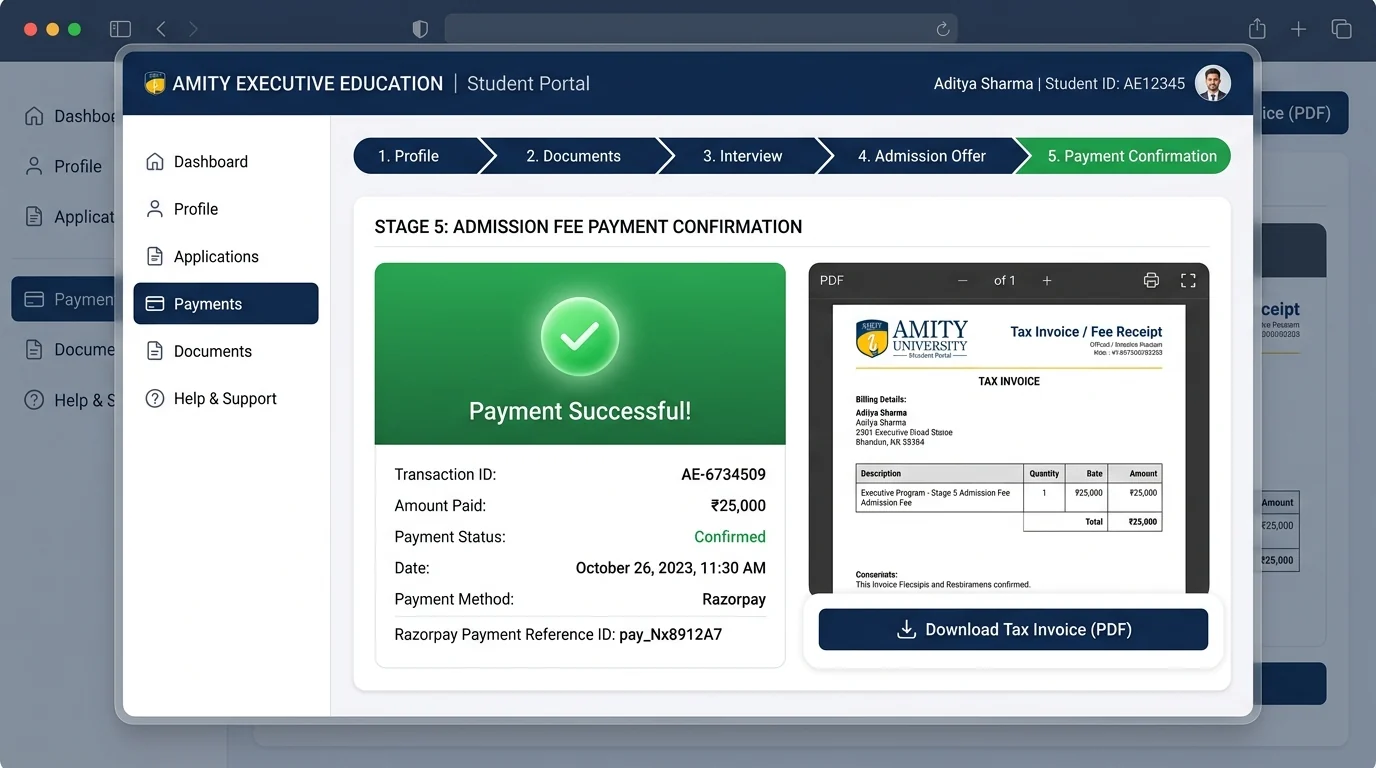
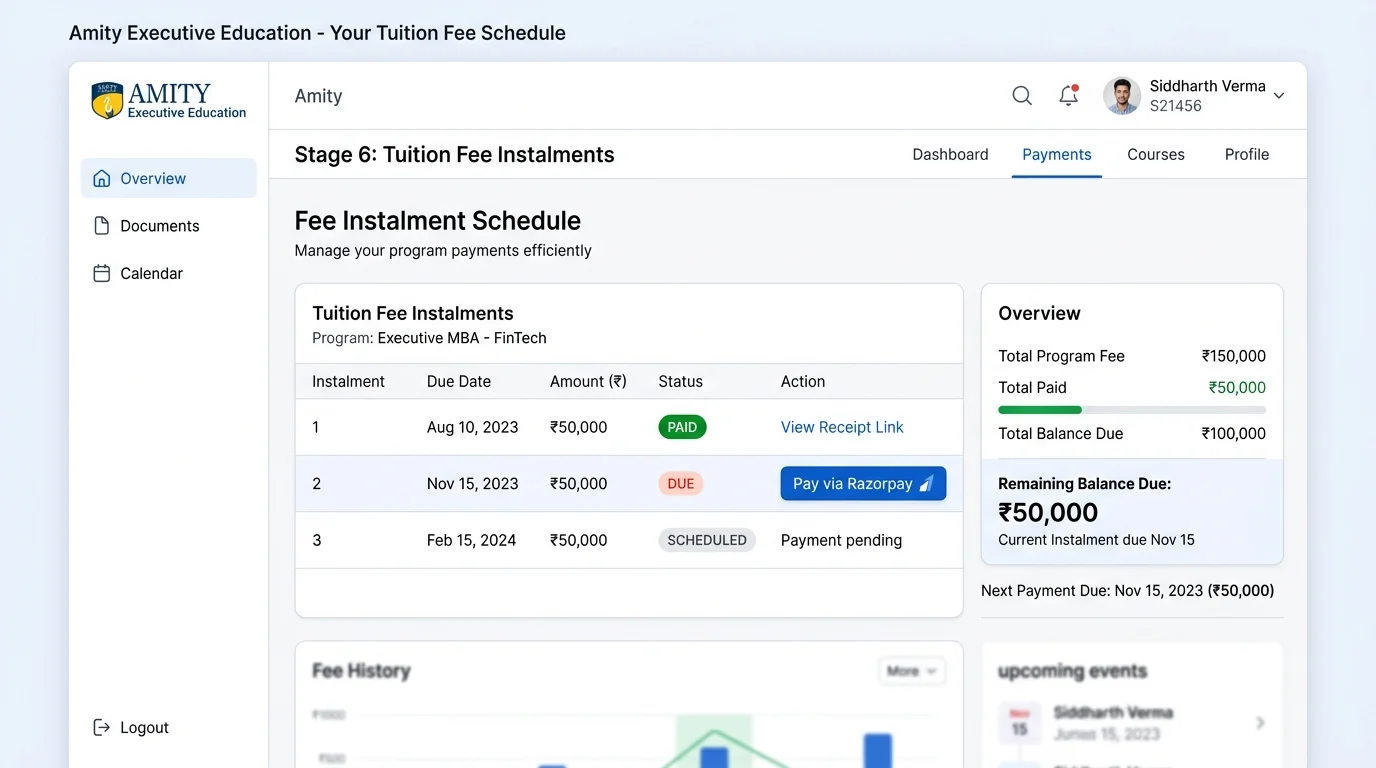
Each stage unlocks only when the one before it is done. Pick a stage to see the screen the applicant or the admissions team uses at that step.
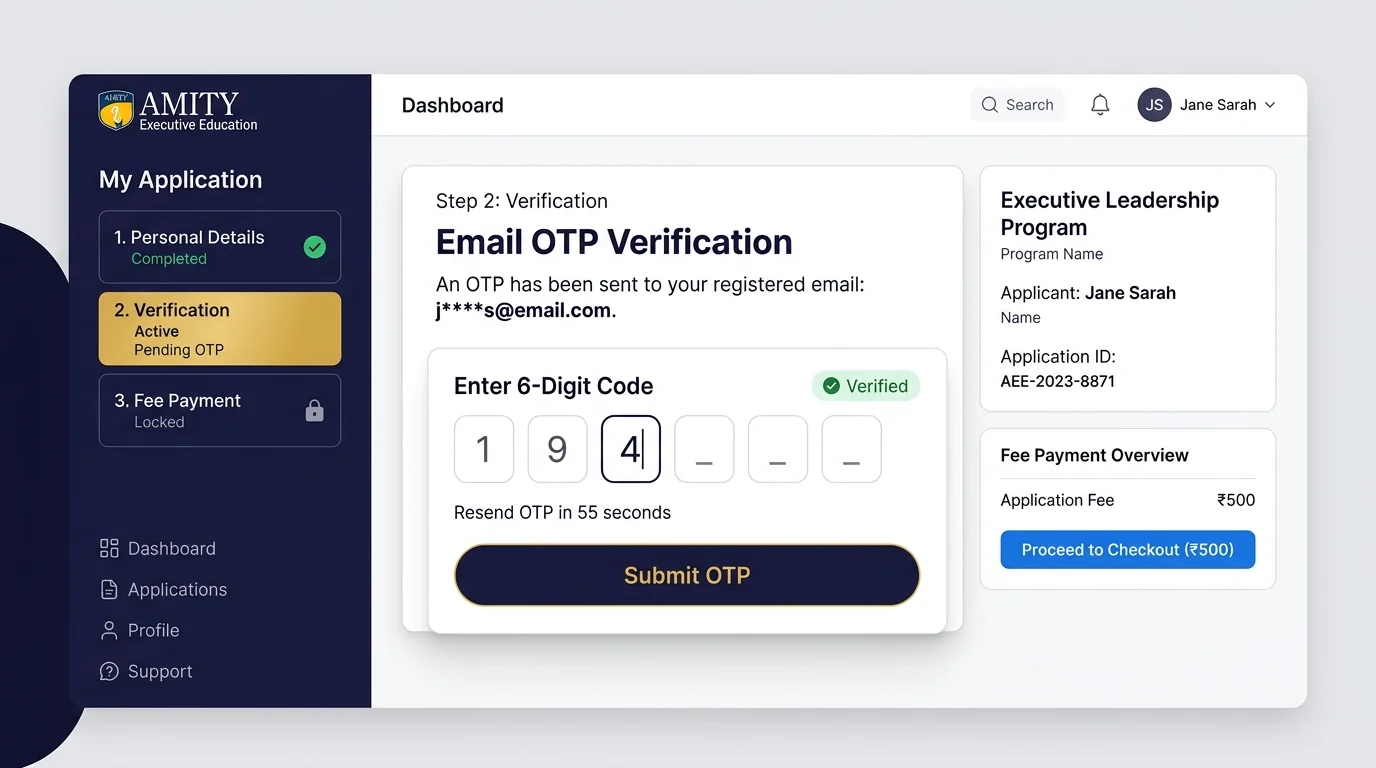
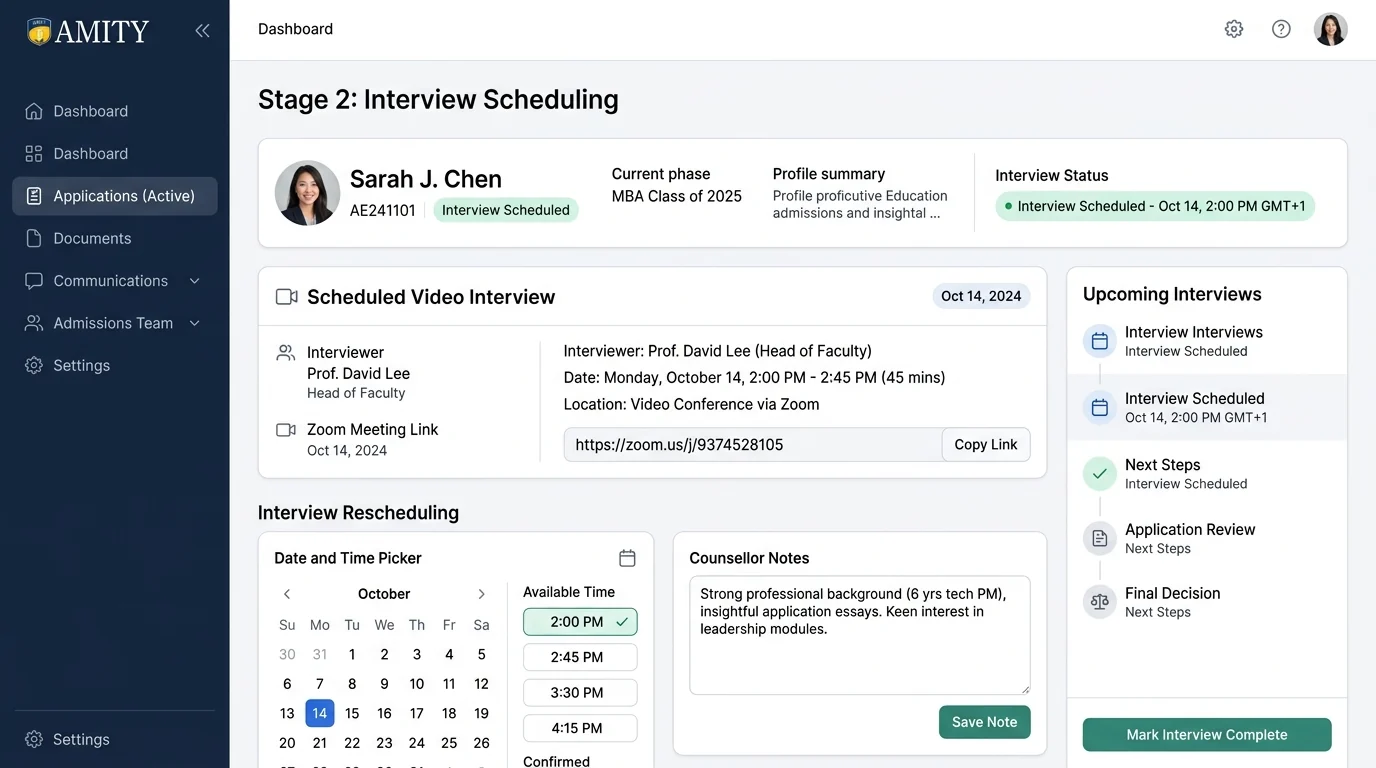
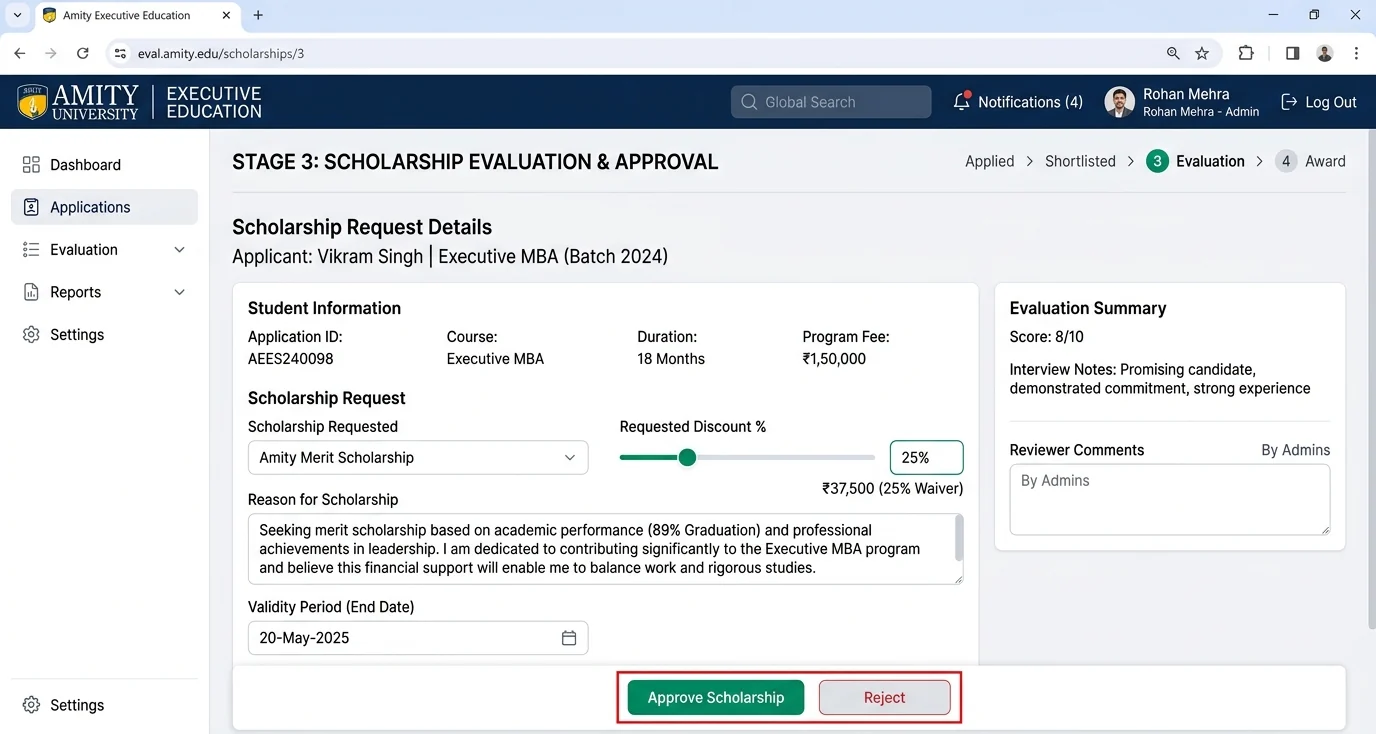
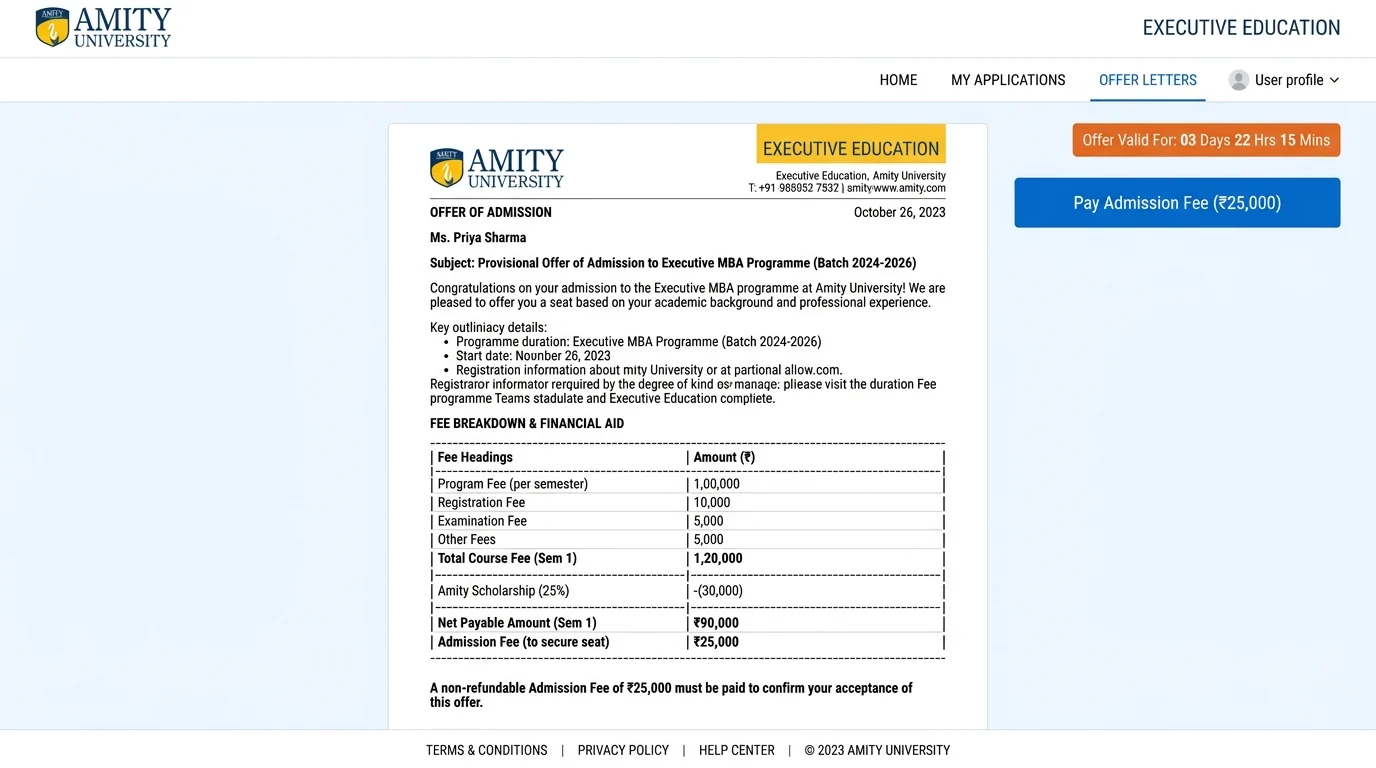
Apply and pay the application fee
The applicant verifies their email with a one-time code, fills a multi-step form, uploads documents and pays the ₹500 application fee online.
LeadSquared: lead captured + event 206Interview
A counsellor schedules the interview, the applicant gets an email invitation with the meeting link, and the counsellor marks it complete with remarks.
LeadSquared: event 205Scholarship
After the interview, a counsellor can request a scholarship of 5% to 50% with a validity date. An admin approves or rejects it.
Offer letter
The offer letter unlocks only when the interview is complete and the scholarship is approved and still valid. It is emailed with a payment link and can be resent.
LeadSquared: event 204Admission fee
The applicant pays the ₹25,000 admission fee from the offer page. Payment is confirmed by the gateway, and a PDF invoice is created.
LeadSquared: event 207Tuition instalments
Tuition is split into instalments of at least ₹50,000, each with its own payment link and reminder. Admission completes when the balance reaches zero.
LeadSquared: event 208These are recreations made with sample data, not captures of Amity's live system, so no real applicant records are shown. Each one follows the stage as it was built. The admin screens in the next section are from the live platform, with personal details blurred.
Illustrative screens with sample data. Click a screen to see it full size.
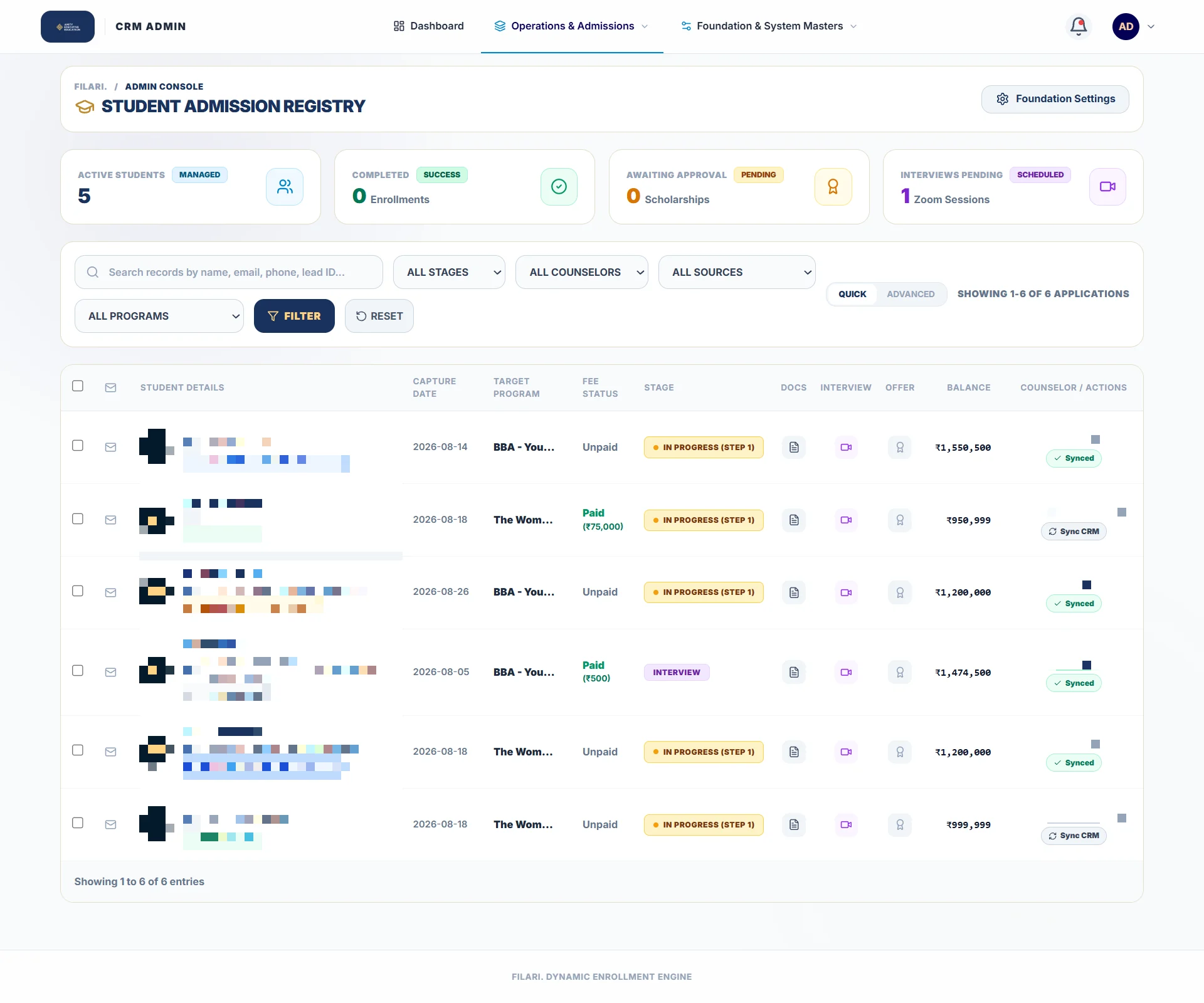
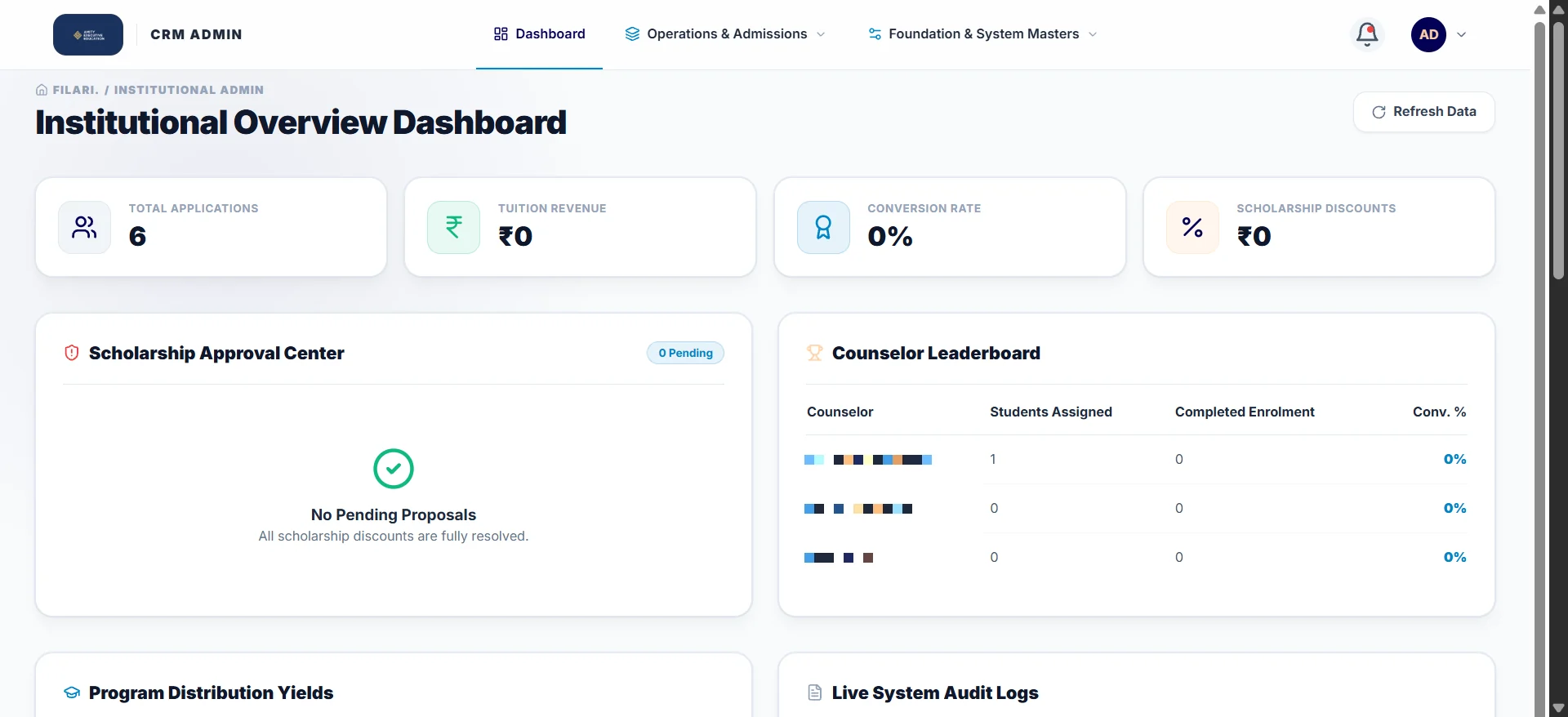
The screens the admissions team works in
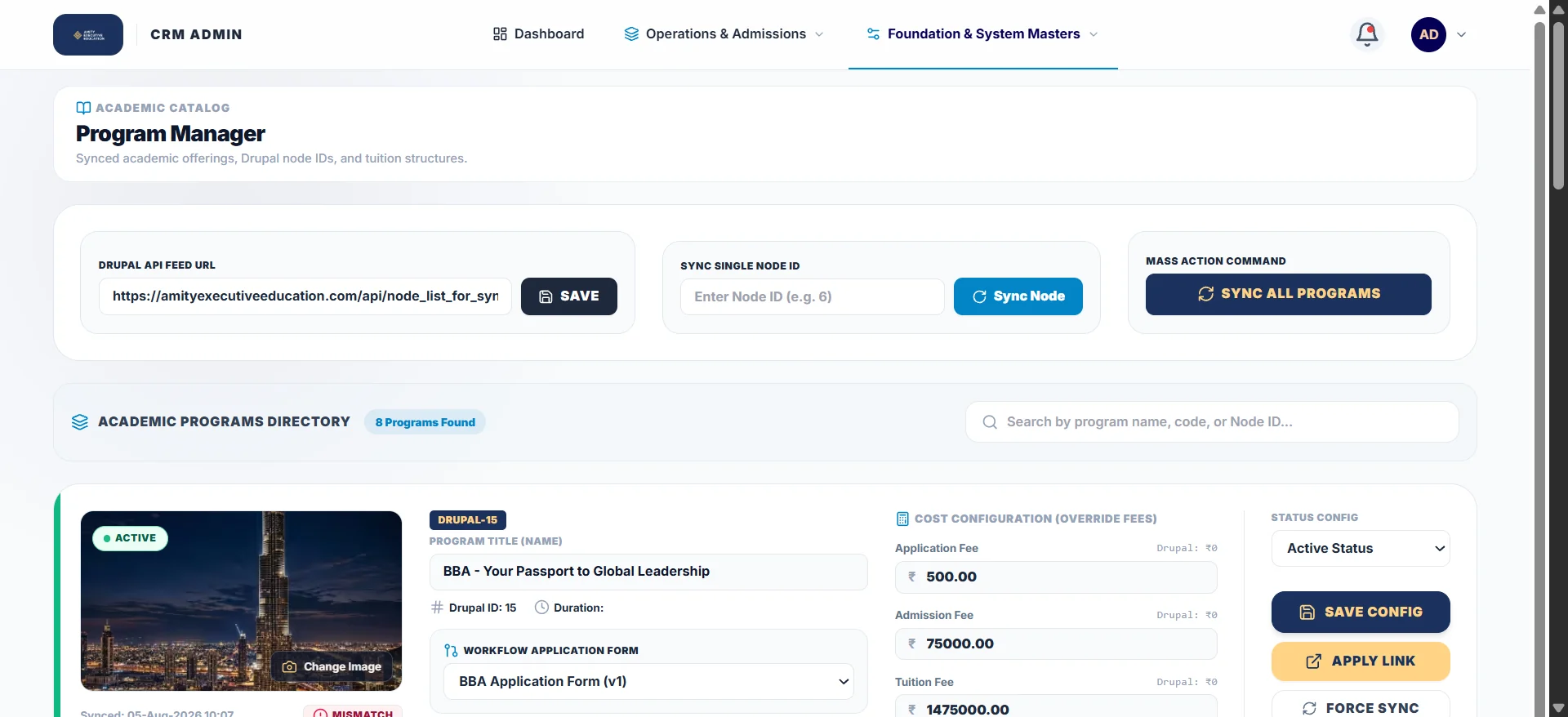
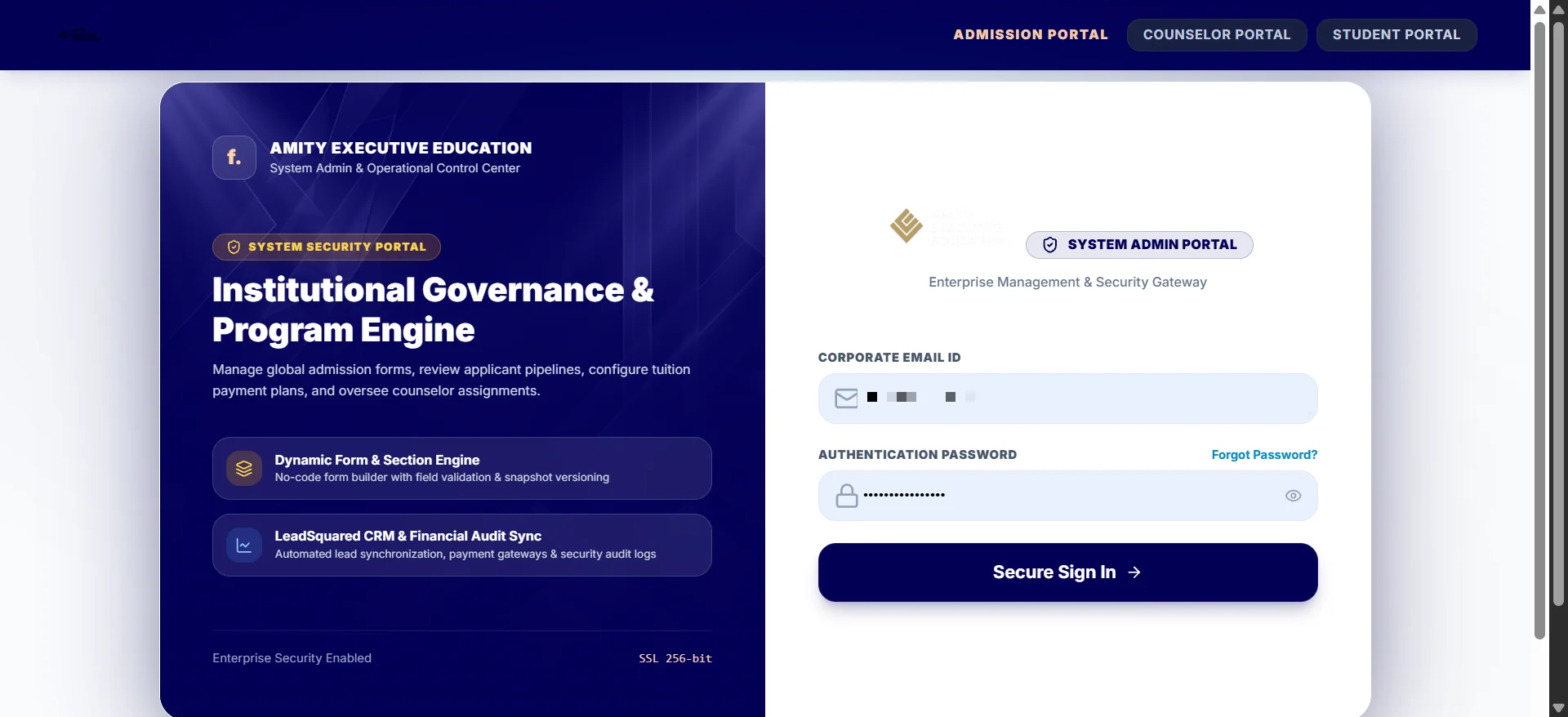
Four screens from the live admin at application.amityexecutiveeducation.com. Applicant names, emails and staff names are blurred.
One form engine, a different application for every programme
Each Amity Executive Education programme asks for different things. A women's leadership programme, a master's programme and a short certificate course cannot share one form. The admissions team sets up each programme's form from the same library of steps and fields, without a developer.
What can change per programme
A new programme can start from a copy of an existing form, then change only what is different.
Women's leadership programme
Gender is preset to Female and locked, and the programme asks for its own set of documents.
Master's programme
Education and work-experience steps are required, with the qualification documents that programme needs.
How the applicant pays
Each programme sets its fee plan. Applicants can pay in full, pay part now and the rest in instalments, or choose to apply for a student loan.
What LeadSquared sees
Registration, payments and progress reach the CRM on their own
Counsellors and managers open the lead in LeadSquared and see how far the applicant has got, what has been paid and what is still due. Nobody copies data from one system to the other, and the reports in the CRM stay current.
The system enforces the rules, so staff don't have to remember them
Every rule below is checked on the server. A counsellor under pressure cannot skip a step or collect a fee twice.
| Rule | How the platform enforces it |
|---|---|
| Offer letter | Only after the interview is complete and the scholarship is approved and within its validity date |
| Scholarship | 5% to 50%, only after the interview, approved by an admin |
| Instalments | Each custom instalment must be at least ₹50,000; paid instalments are never renumbered |
| Paying twice | A fee or instalment that is already paid cannot be paid or marked paid again |
| Identity | Email identifies a student and cannot be changed from an application edit |
| Payments | Every payment belongs to one application, not just the student |
| Addresses | India shows state and city lists; other countries switch to free-text fields |
Eight parts of one admissions platform
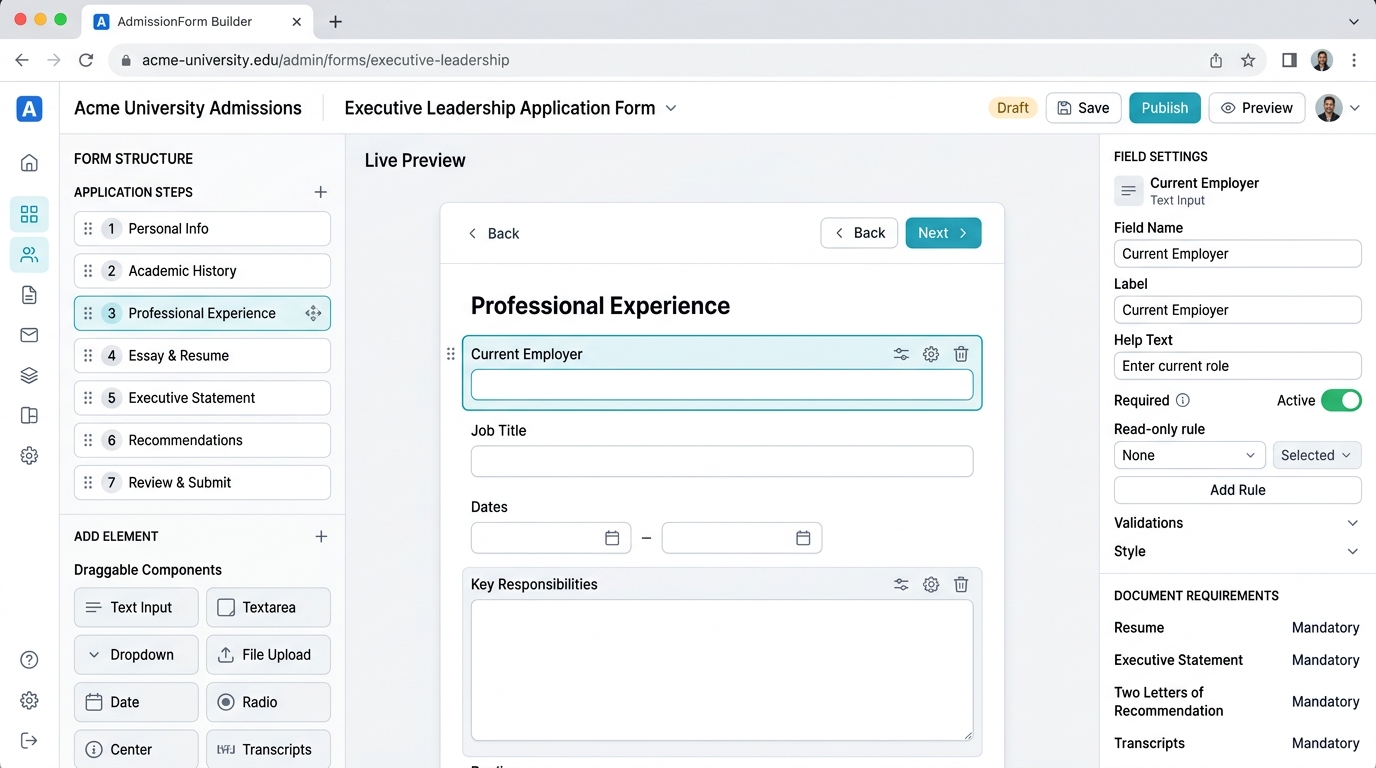
A form builder the admissions team runs
New programme, new form, no developerAdmins build forms from steps, sections and fields, set required rules and show or hide fields based on answers. Each submitted form is frozen as a snapshot, so later edits never change what an applicant sent.
LeadSquared kept in sync
The CRM always knows where an applicant isApplication start, interview, offer letter, admission fee and tuition payments are sent to LeadSquared as events 204 to 208. Calls run in the background and are logged, and a CRM outage never blocks an applicant.
One student, many applications
No duplicate applicantsEmail is the identity. A second programme adds a second application to the same student, each with its own details and payments.
Online payments at every stage
Paid from a link, confirmed automaticallyEach fee and instalment has its own Razorpay or PayU link. Signed webhooks confirm payment even if the applicant closes the browser.
Invoices and payment reports
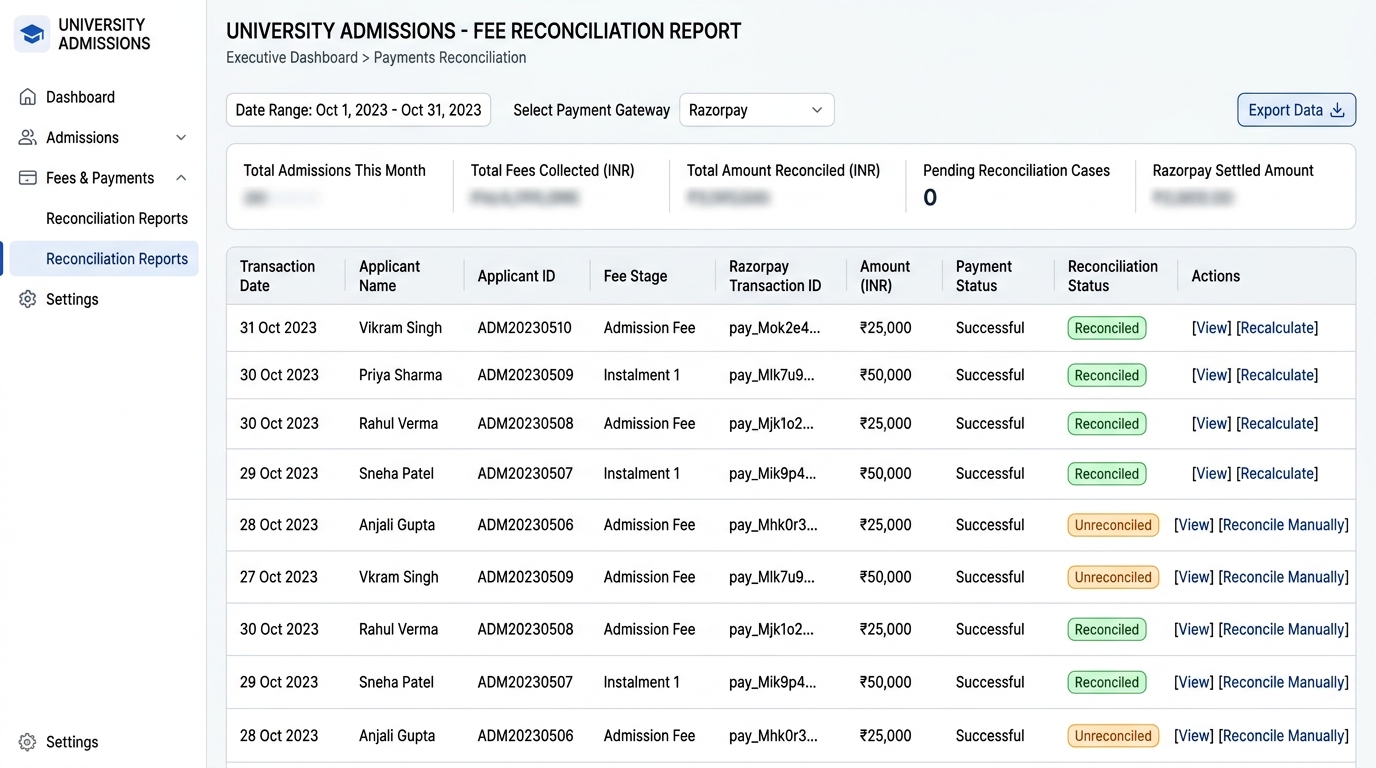
Finance can reconcile in minutesEvery confirmed payment gets a numbered PDF invoice. Finance can import payments from Razorpay and attach any unmatched payment to the right application.
A workspace for each counsellor
Everyone sees only their applicantsCounsellors are mapped to their LeadSquared owner IDs, see their own applicants and leads, and can start an application for a lead in one click.
Emails that go out on their own
Applicants always know the next stepOTP codes, account creation, interview invitations, offer letters, fee links, instalment reminders and receipts are sent from branded templates.
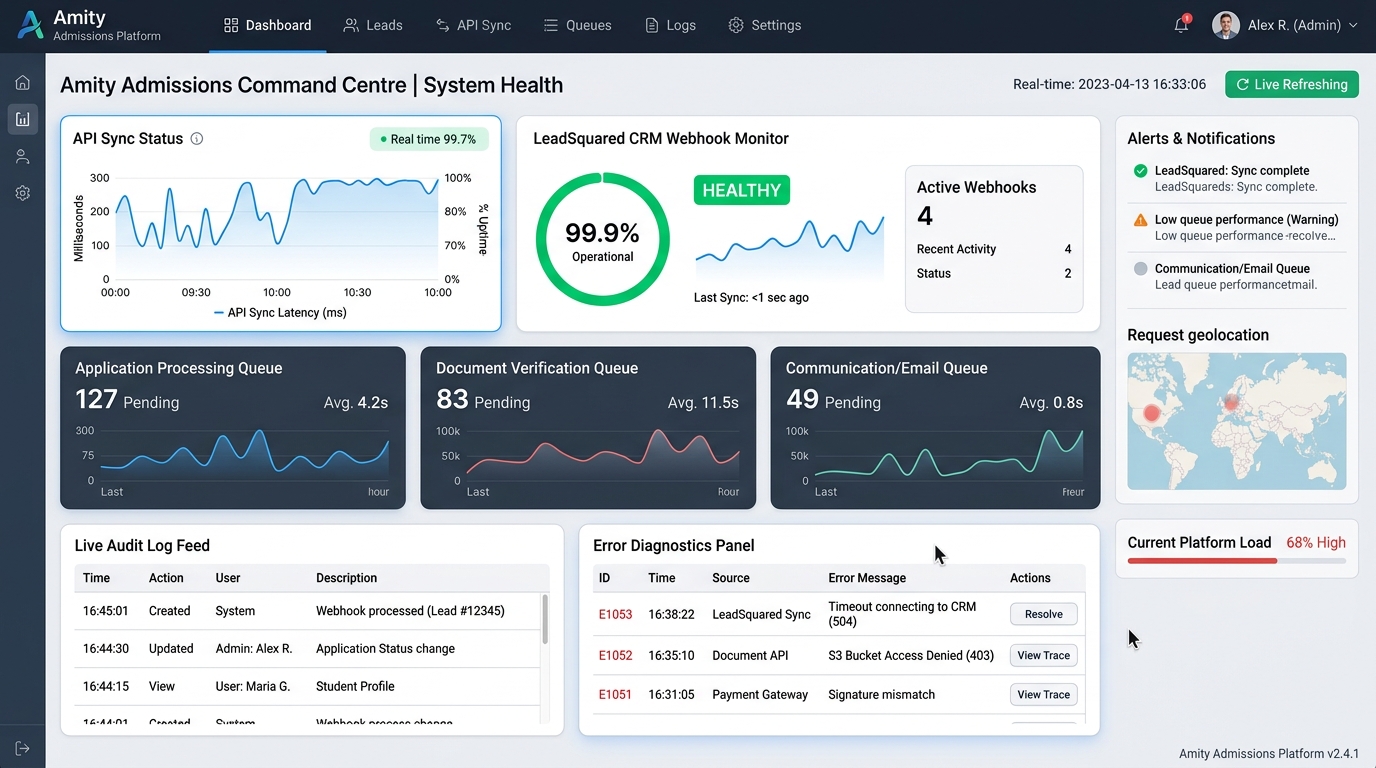
A command centre for the platform
Problems are seen before applicants report themAdmins see errors, audit logs, login history and system health in one screen, test email settings and download an error report for any failure.
Spec first, then build, then check it against real data
We wrote the workflow and rules down before building, shipped every database change as a migration, and audited the live system against the spec.
- 01
Understand
Mapped the admission journey and the LeadSquared events it had to produce.
Amity Executive Education got: a written workflow spec and business rules.
- 02
Design the data
Designed the database for students, applications, forms, stages and payments.
Amity Executive Education got: one record per applicant, many applications per student.
- 03
Build
Built the form builder, applicant portal, admin and counsellor workspaces, payments and CRM sync.
Amity Executive Education got: a working platform, stage by stage.
- 04
Audit and fix
13 Aug 2026Checked the live CRM sync against the spec and the live database, and fixed a gap where new applications never reached LeadSquared.
Amity Executive Education got: CRM data you can trust.
- 05
Launch
Deployed to staging, then production, with a migration for every database change.
Amity Executive Education got: a live admissions portal.
- 06
Grow
Invoices, payment import from Razorpay, reports and a system health console.
Amity Executive Education got: small, safe releases.
Where AI helped, and where people led
Human-led, AI-accelerated. Our team made every design and architecture decision and reviewed every change. The tools used will be listed here once confirmed.
Three decisions that keep admissions in order
No-code, per-programme forms
A coded form for every programme
The admissions team builds and changes forms itself, and each submission is saved as a frozen snapshot that is never rewritten.
CRM events sent from background jobs
Calling LeadSquared during the page request
A slow or failed CRM call never blocks the applicant, and every milestone still reaches LeadSquared.
Programme list synced from the Drupal website
Typing programmes into two systems
Programme names stay identical on the website and in the admission platform.
What we learned
Admissions software succeeds when the stages are agreed before any screen is built. Writing down the six stages and the rule that guards each one turned scattered tools into one record per applicant. Forms, payments and CRM events then follow the same order.
One platform for the whole admissions team
Amity Executive Education's admissions team now works from one platform. Each applicant has one record, each stage has rules, each payment is matched to its application, and LeadSquared hears about every milestone without anyone copying data.
From first form to last instalment, every stage sits on the same record.
A step cannot be skipped: interview, scholarship, offer letter and fees follow in order.
Razorpay and PayU results attach to the right application and instalment.
Five milestone events are sent to the CRM from background jobs.
For tech teamsUnder the hood
Stack, architecture, engineering decisions and build metrics
Stack by layer
Application
Laravel 13 on PHP 8.3
Mature framework for forms, queues, mail and migrations
Blade + Tailwind CSS 4 + Vite
Server-rendered pages that load fast on any device
Data
76 database migrations
Every schema change is repeatable on staging and production
Form snapshots
What an applicant submitted is frozen and never rewritten
Integrations
LeadSquared REST API
Lead capture and events 204–208, sent from background jobs
Drupal programme sync
Programme list pulled from Amity Executive Education's website instead of typed twice
Payments
Razorpay and PayU
HMAC-verified callbacks and webhooks
DomPDF
Numbered PDF invoices generated on the server
Operations
Command centre
Central audit, error snapshots, log retention and health checks
Role-based access
Admin, counsellor and student areas, with violations logged
Architecture
Applicants, counsellors and admins use one Laravel application. It stores data in a relational database, sends CRM events to LeadSquared through background jobs, pulls the programme list from Amity Executive Education's Drupal website, takes payments through Razorpay or PayU with webhooks back to the server, and sends email over SMTP.
Engineering decisions
| Decision | Why | Impact |
|---|---|---|
| Email is the student identity | Two records for one person split their history | One student, many applications, no duplicates |
| Payments belong to an application | A student applying twice must not see one fee on both | Clean, per-programme fee history |
| Webhook plus callback, confirmed once | Applicants close the browser before the redirect | No missed or double-counted payments |
| CRM calls never block the applicant | A LeadSquared outage must not cost an application | Failures are logged; the form still saves |
| Rules checked on the server | Staff can make mistakes under pressure | No offer letter before interview and approved scholarship |
| Audit against the live database | Code that looks right can still fail silently | Found and fixed a gap where no application had reached LeadSquared |
Build metrics · counted from the repository
Automated tests for the payment and stage rules, and verifying the admission fee default and interview attendance checks listed as open items in the audit.
Questions admissions leaders ask us
An admission management system is software that runs the whole admission journey in one place: application forms, documents, interviews, scholarships, offer letters and fee payments. Amity Executive Education's platform also sends each milestone to its LeadSquared CRM, so counsellors and managers see the same status.
Yes. In Amity Executive Education's platform, admins build forms from steps, sections and fields, set required rules, and show or hide fields based on earlier answers. Each submitted form is saved as a frozen snapshot, so changing the form later does not change what applicants already sent.
Yes. In Amity Executive Education's platform, each programme has its own form built from a shared library. Admins can turn steps on or off, show, hide or require fields, set default values and choose the documents to upload. A women's leadership programme, for example, presets gender to Female and asks for its own documents.
The platform captures a lead when an applicant starts an application and sends LeadSquared events for application start, interview, offer letter, admission fee and tuition payments. Calls run in the background and are logged, and a CRM outage never stops an applicant from saving their form.
Amity Executive Education's platform supports Razorpay and PayU for UPI, cards and net banking. Each fee and instalment gets its own payment link, payments are confirmed by signed webhooks, and a numbered PDF invoice is created for every confirmed payment.
A scholarship of 5% to 50% can be requested only after the interview and must be approved by an admin. The offer letter can be generated only when the interview is complete and the approved scholarship is still within its validity date.
Yes. The student is identified by email, so a second application attaches to the same student record. Each application keeps its own answers and its own payments, so fees for one programme never appear on another.
It depends on the number of stages and integrations. Filari built Amity Executive Education's platform, with six stages, LeadSquared sync and two payment gateways, in about four weeks based on the project's database history.
Running admissions across forms, spreadsheets and a CRM?
Tell us how your admissions run today. We will map the stages and show you what one platform looks like.
More projects like this one
 Education
Drupal to Next.js in 48 Hours: Executive Education Platform
Rebuilding Amity Executive Education's programme finder, compare tool, counselling leads and payment gateway on Next.js 15.
 Corporate Learning
From Prototype to Live Corporate Training Platform
Filari built the backend, security, GST billing and reporting behind Amity's training-credit prototype and put it live, keeping the approved design.
Study-Abroad Website to a Complete Digital Student Platform
CMS, Student Management, Inquiry Management, Payments and My Account connected into one study-abroad platform, delivered in 2–3 weeks.